
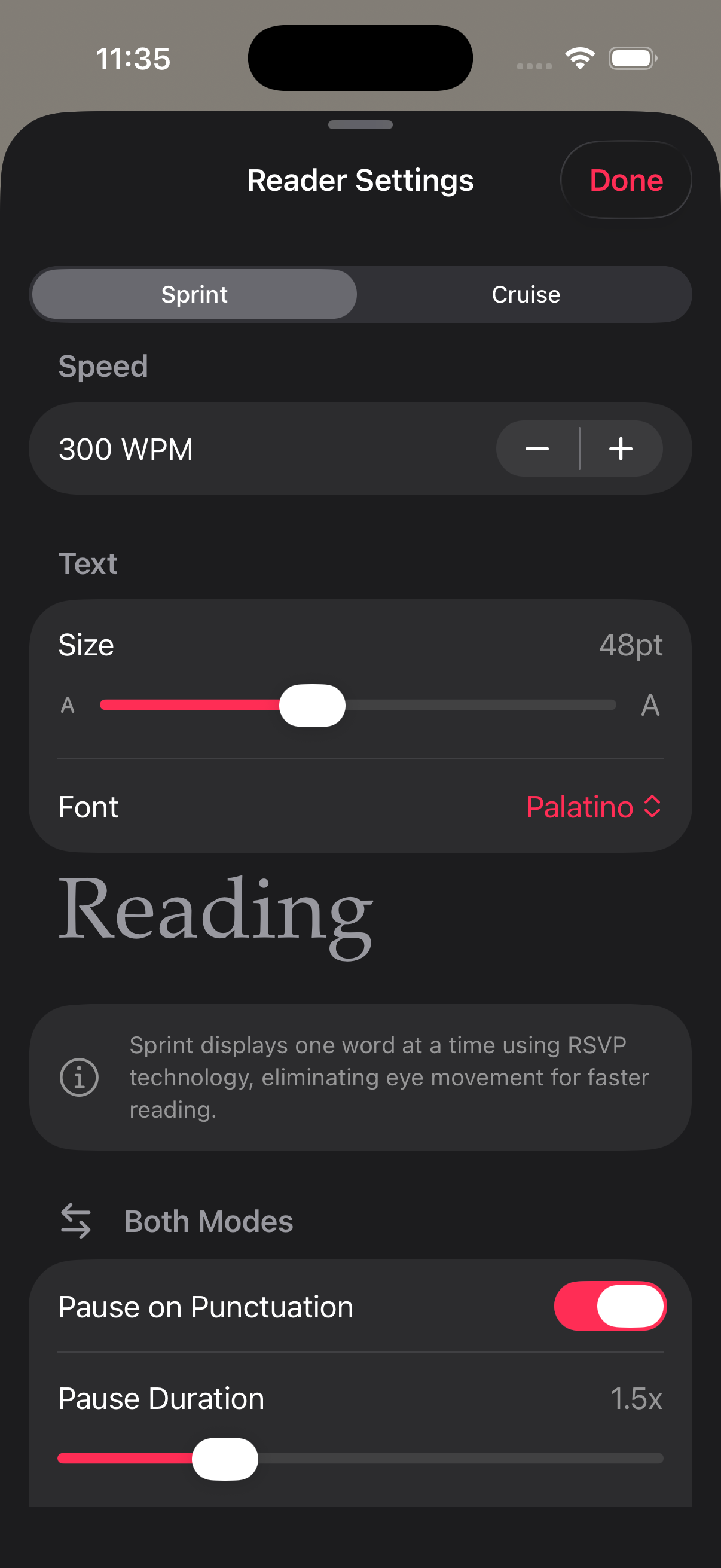
Custom reading settings app pages answer a simple question. Can this reader bend to the text and the person using it, or does it force one style on everyone? RSVP Reader is built around control. The App Store listing calls out adjustable WPM, ORP highlighting, smart punctuation pauses, and multiple reading modes. Inside the app, the settings go further with theme choice, font choice, font size, line spacing, transition style, pause behavior, and a listen mode with voice controls. That matters because reading is not one job. A short article on a walk, a dense PDF at night, and a chapter from an EPUB all ask for different pacing and different visual treatment.
Why a custom reading settings app matters
Custom reading settings app searches usually come from people who already hit the limit of one-size-fits-all reading. They tried a reader that looked clean for thirty seconds, then fell apart during a real session. Maybe the font felt cramped. Maybe the pace felt rushed. Maybe the display looked fine in bright light and tiring in a dark room. Maybe the app worked for news articles but not for book chapters or research papers. Those problems are not small polish issues. They change whether someone stays with the product.
Here is why. Reading comfort decides session length. Session length shapes habit. Habit shapes whether the app becomes part of daily life or gets deleted after two tries. That is why a custom reading settings app should not hide its controls under a vague promise like “personalized reading.” Readers want to know what they can actually change.
Apple’s own support pages push the same idea. Apple Support shows people how to change the font size on iPhone, how to use Display and Text Size settings on iPhone, and how to adjust voice and speed for spoken content. Apple treats readability as a practical setup choice. RSVP Reader should frame its settings the same way.
The settings that change reading, not just appearance
Let’s break it down. A custom reading settings app earns its place when its controls change how text feels to read, not just how the interface looks in a screenshot.
The first group is pace. Readers need quick WPM control, pause behavior, and sometimes alternate timing when the text gets dense. The second group is legibility. Font choice, font size, line spacing, and emphasis style shape how quickly the eye settles. The third group is comfort. Theme choice and contrast decide whether the app still feels usable after ten or twenty minutes. The fourth group is mode choice. A fixed-gaze RSVP view works differently from a fuller reading view or a listen mode.
That four-part structure matters because it helps people choose settings with a purpose. If the material is familiar and light, bump the pace. If the material is dense, widen the spacing and slow the timing. If your eyes are tired, switch themes or move to listen mode. A custom reading settings app should make those decisions easy enough to use in the moment, not only during a first-run setup.
Speed controls should stay close to the text
Readers touch speed first, so a custom reading settings app needs to make pace changes feel immediate. The RSVP Reader App Store listing says the app supports 100 to 1000+ WPM. That range matters, but the range is only useful if people can move within it quickly while reading real material.
This is where many reading apps get awkward. They offer a broad speed range on paper, then bury the control inside a separate screen. RSVP Reader works better when speed changes stay part of the reading session. A reader can push the WPM up for familiar sections, drop the WPM when a paragraph gets technical, and keep going without restarting the session.
Next steps. If someone is still figuring out what pace is realistic, this page should move them to what is a good reading speed or the reading speed test. A custom reading settings app page should not pretend that one magic number works for everyone. It should show that pace is adjustable because material changes.
Fonts and themes are reading controls
A lot of product pages talk about fonts and themes as if they are style accessories. That misses the point. In a custom reading settings app, fonts and themes change fatigue and reading confidence. Letter shape matters. Spacing matters. Contrast matters. What feels crisp in the afternoon can feel harsh at night. What feels calm with large type may feel cramped when the size drops.
Apple’s text-size guidance is useful here because it starts with a direct action. Change the font size. If needed, make text even bigger. That is not presented as decoration. It is presented as a way to keep the screen readable. RSVP Reader should describe custom fonts and themes with the same tone. Readers are not choosing a look just to make the app pretty. They are choosing a screen they can stay with.
This is also where full-text reading and paced RSVP reading start to overlap. A theme that looks good in a single-word view may feel too stark in a long scroll. A font that reads well in a paragraph may feel too soft in a fixed-gaze mode. A custom reading settings app should let users move across those cases without feeling punished for wanting control.
Spacing and visual emphasis shape where the eye lands
Custom reading settings app searches often mention fonts and speed, but spacing and emphasis are just as important. Line spacing changes how crowded a page feels in fuller reading modes. Highlight style changes how strongly the app pulls the eye to a focus point. ORP or emphasis behavior changes the rhythm of recognition inside each word.
Here is why this matters. Reading speed is not only about how fast the words appear. It is also about how quickly the eye knows where to land next. If a screen feels crowded, the eye keeps doing extra search work. If a highlight style feels too loud, the display starts to feel jittery. If it feels too faint, the guidance disappears. A custom reading settings app should give readers room to set that balance instead of choosing a single visual theory for them.
This is one reason RSVP Reader can speak clearly to people who are comparing different methods. Some readers want classic RSVP pacing. Some want a fuller reading surface with strong emphasis. Some want a calmer full-text session with fewer visual cues. The app is stronger when the settings page makes those paths obvious and task-based.
Pauses matter more than people expect
Many reading tools stop at “pick a speed and go.” Real reading does not work like that. Sentences have commas, clauses, dialogue, lists, and abrupt shifts in difficulty. A custom reading settings app feels better when it reacts to those changes through pause controls and timing behavior.
RSVP Reader’s public product copy mentions smart punctuation pauses. That is more useful than it sounds. A comma, a colon, or the end of a sentence often needs a fraction more time than the body of the text. Without that small pause, a reader can feel like the app is always a step ahead of meaning. With it, the reading flow feels less mechanical.
Let’s break it down. A fast session is not the same as a rushed session. People want pace, but they also want enough room to process structure. A custom reading settings app should explain that pause settings do not slow everything down. They place a little extra time where language needs it most.
Mode choice is part of customization
A custom reading settings app is not only a page about sliders. It is also a page about choosing the right reading surface for the material. RSVP Reader already separates reading into more than one mode. That means settings should be explained in the context of those modes, not as one universal list.
If the user is moving quickly through an article, a fixed-gaze view may be the right choice. If the user needs fuller context, a different mode may fit better. If the eyes are tired or the user is walking, a listen mode may be the better call. That is why this page should link directly to reading modes and listen mode. A custom reading settings app is strongest when each control has a clear reason to exist.
This also helps prevent disappointment. People do not need every setting in every moment. They need the right few controls for the reading job in front of them. A feature page that admits that feels more honest and more useful.
A calmer setup helps focus-oriented readers
Some users do not search for a custom reading settings app because they love tweaking software. They search because they lose focus when the presentation works against them. Too much contrast can feel harsh. Too little emphasis can make text drift. A font can feel cramped. A transition can feel distracting. A pace that looks fast on paper can feel unsteady in real use.
That is why customization overlaps with a reading app for focus, and why the same font, spacing, and contrast controls support dyslexia-friendly reading. This page should stay away from medical claims. It does not need them. It can say something simpler and more useful. A calmer, more adjustable screen can reduce drift, reduce irritation, and help readers build a repeatable session setup.
For some people that means slower WPM and stronger visual emphasis. For others it means lighter emphasis, more spacing, and a softer theme. The point is not that one setting set works for everyone. The point is that the app does not trap them inside one reading style.
Settings should help long-form reading, not only short articles
Custom reading settings app queries often come from people working through longer material. EPUB chapters, technical PDFs, scanned pages, and course reading packets put more pressure on the display than a short news article does. Over a longer session, little details become bigger problems. A font that felt fine for three minutes starts to annoy. A bright theme gets tiring. A pacing choice that worked for short pieces begins to hurt comprehension.
That is why settings pages should connect to actual workflows. Link to read PDFs faster on iPhone. Link to read EPUBs faster on iPhone. Link to change fonts, themes, and speed. The message is simple. A custom reading settings app is not only about preference. It is about staying comfortable long enough to finish the material you brought in.
How to talk about customization without hype
This page should make a plain promise. RSVP Reader lets you change the parts of reading that change comfort and pace. That includes WPM, visual emphasis, fonts, themes, spacing, and timing. It also lets you switch reading modes when the material calls for a different surface.
It should not pretend that settings alone make someone read twice as fast overnight. It should not talk like every slider is a breakthrough. People trust settings pages when they sound grounded. Tell them what the controls do. Tell them why they matter. Show the screen. Then move them to the task page or help page that matches what they are trying to change.
Next steps
If this is the feature you care about most, the next move is practical. Read change fonts, themes, and speed for step-by-step setup. Then compare the surfaces in reading modes. If you want a calmer session with audio support, see listen mode. A custom reading settings app is only useful when the controls are close enough to the text that people actually use them. That is the standard this page should set.
Sources
RSVP Reader: Speed Reading App | Apple App Store | April 1, 2026 | https://apps.apple.com/us/app/rsvp-reader-speed-reading/id6757968737 Change the font size on your iPhone, iPad, and iPod touch | Apple Support | August 22, 2023 | https://support.apple.com/en-us/102453 Display and text size on iPhone | Apple Support | Publication date not listed | https://support.apple.com/guide/iphone/display-and-text-size-iph3e2e1fb0/ios Adjust voice and speed for VoiceOver and Speak Screen on your iPhone, iPad, and iPod touch | Apple Support | February 15, 2024 | https://support.apple.com/en-us/111798